Lower your warehouse costs via DuckDB transpilation
Many people seem to admire DuckDB. But most of us are stuck with our traditional warehouses, because they’re entrenched in our data stacks and IT landscape. This is with good reason: BigQuery, Snowflake, ClickHouse and co. are great software. But they’re not cheap, and keeping a warehouse’s monthly bill under control is non-trivial.
What if you could get the best of both worlds? Tables could be kept in your warehouse of choice, but computed with DuckDB. There’s been some discussion on multi-engine warehouses – see this article by Julien Hurault and Sung Won Chung. But their proposition is to assign each table to one engine. Multi-engine stacks can be useful, and SQLMesh provides support for it. But to me it sounds too sophisticated, and I’m not convinced it’s what most practitioners want/need.
Instead, you can leverage transpilation to run a single query on more than one engine. Tools like SQLGlot and Polyglot allow converting SQL from one dialect to another. You can thus keep all your SQL scripts written for, say, BigQuery, transpile them to DuckDB, and execute them on your laptop. That’s the theory at least. However, in practice, dbt and SQLMesh don’t provide an obvious way to do so.
At my day job we use lea, which is a minimalistic data orchestrator. It’s far simpler and less feature-rich than dbt/SQLMesh, which allows quickly iterating on new ideas. I’ve recently added a --quack flag which enables what I call quack mode:
$ lea run --select finance.moolah --quack
[19:47:29] 📝 Reading scripts
           283 table scripts
           45 test scripts
           🦆 Quack mode enabled
           🦆 Loading BigQuery extension for DuckLake
           🦆 Pulling 4 dependencies into DuckLake
           PULLING kaya.max.finance__subscriptions → finance.subscriptions
           PULLING kaya.max.ops__time_sheet → ops.time_sheet
           PULLING kaya.max.finance__payroll → finance.payroll
           PULLING kaya.max.meetings → ops.meetings
[19:47:33] SUCCESS ops.time_sheet, 1,083 rows (3.3s)
           SUCCESS finance.business_days, 13 rows (3.4s)
           SUCCESS finance.payroll, 25,225 rows (3.9s)
[19:47:34] SUCCESS finance.subscriptions, 94,500 rows (4.1s)
           🔵 Running 1 script
           RUNNING finance.moolah (DuckLake)
           SUCCESS finance.moolah, contains 2,096 rows
           😴 Ending session
           ✅ Finished, took 0:00:05
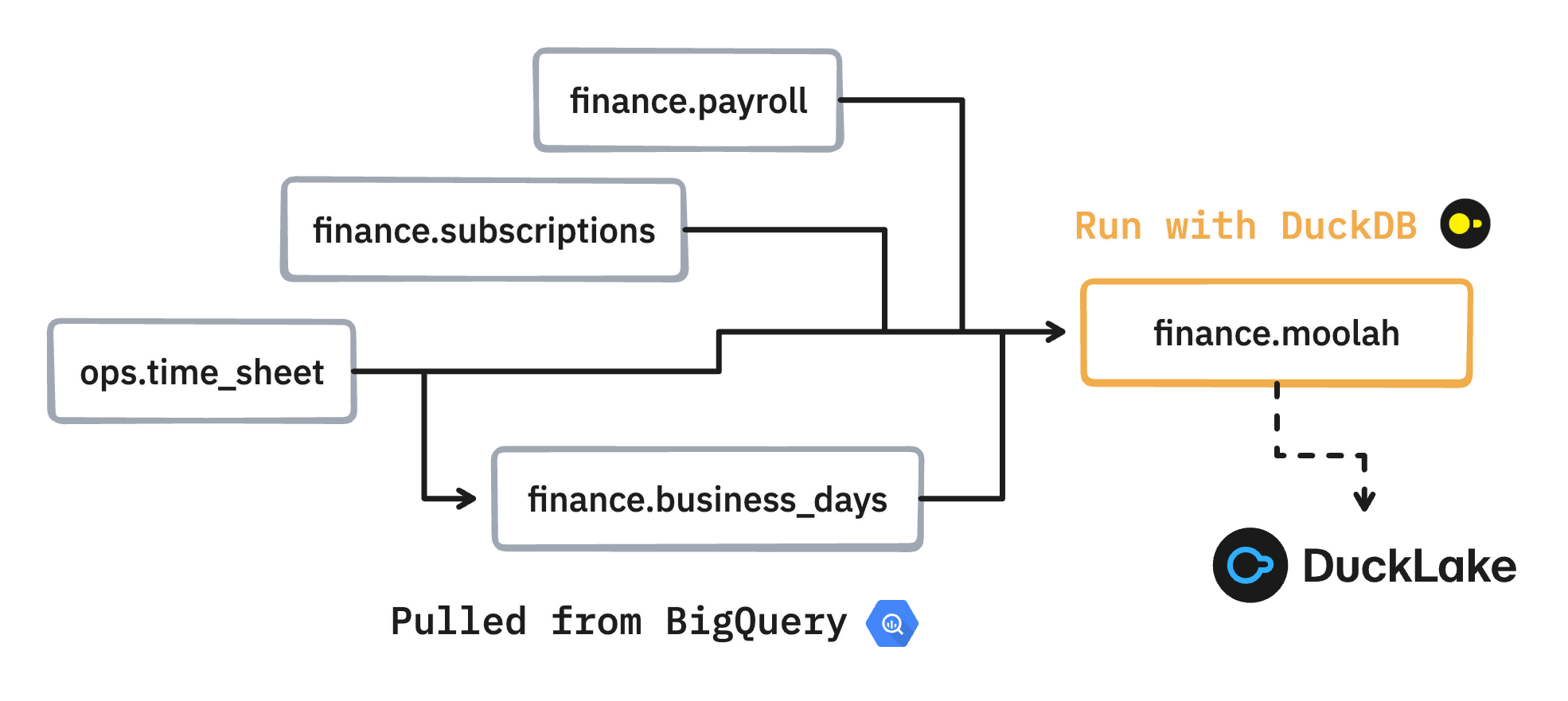
This takes the finance/moolah.sql script, which is written for BigQuery, converts it to DuckDB syntax, executes the transpiled query on my laptop, and materializes the output in DuckLake. The finance/moolah.sql script has four dependencies, which have to be pulled to DuckLake in order to execute the script. The tables are pulled from the max dataset in the kaya BigQuery project. This is doable thanks to the DuckDB BigQuery community extension.
DuckLake basically promotes DuckDB into a data warehouse. As mentioned in a previous blog post, it is to me the last piece of the puzzle for enabling cheap data orchestration. You can configure DuckLake to store data locally. But more usefully you can point it to any S3/GCS/FUSE file system and it will work too. That’s great, because storing tables on your laptop is not great when they’re big. In lea everything is configured with environment variables, and here’s how to configure DuckLake using a GCS bucket for storage:
LEA_QUACK_DUCKLAKE_CATALOG_DATABASE=quack.ducklake
LEA_QUACK_DUCKLAKE_DATA_PATH=gcs://kaya/data
LEA_QUACK_DUCKLAKE_GCS_KEY_ID=GOOG1EFOTJU3F5FVQX547HCFKGBPBBJGZG6BC56C6A5KL6B4PSHG3NBIJR3EZ
LEA_QUACK_DUCKLAKE_GCS_SECRET=<keep_it_secret_keep_it_safe>
Instead of refreshing a single table, I may want to refresh the whole finance/ schema:
$ lea run --select finance/ --quack
[10:10:23] 📝 Reading scripts
[10:10:24] 283 table scripts
           45 test scripts
[10:10:27] 275 tables already exist
           🦆 Quack mode enabled
           🦆 Loading BigQuery extension for DuckLake
           🦆 Pulling 2 dependencies into DuckLake
           PULLING kaya.max.ops__meetings
           PULLING kaya.max.ops__time_sheet
[10:10:32] SUCCESS kaya.max.ops__meetings, 3,210 rows (3.1s)
           SUCCESS kaya.max.ops__time_sheet, 1,083 rows (3.2s)
           🔵 Running 4 scripts
           RUNNING finance.business_days (DuckLake)
           SUCCESS finance.business_days, contains 13 rows
[10:10:33] RUNNING kaya.max.finance.payroll (BigQuery)
           RUNNING kaya.max.finance.subscriptions (BigQuery)
[10:10:36] SUCCESS kaya.max.finance.payroll, took 0:00:03, cost $0.00, contains 25,225 rows, weighs 2MB (on-demand billing)
           SUCCESS kaya.max.finance.subscriptions, took 0:00:03, cost $0.00, contains 94,500 rows, weighs 6MB (on-demand billing)
           🦆 Refreshing bq extension metadata cache
           RUNNING finance.master_sheet (DuckLake)
[10:10:39] SUCCESS finance.master_sheet, took 0:00:03, contains 2,096 rows
           😴 Ending session
           ✅ Finished, took 0:00:16, cost $0.00
Here’s the voice-over:
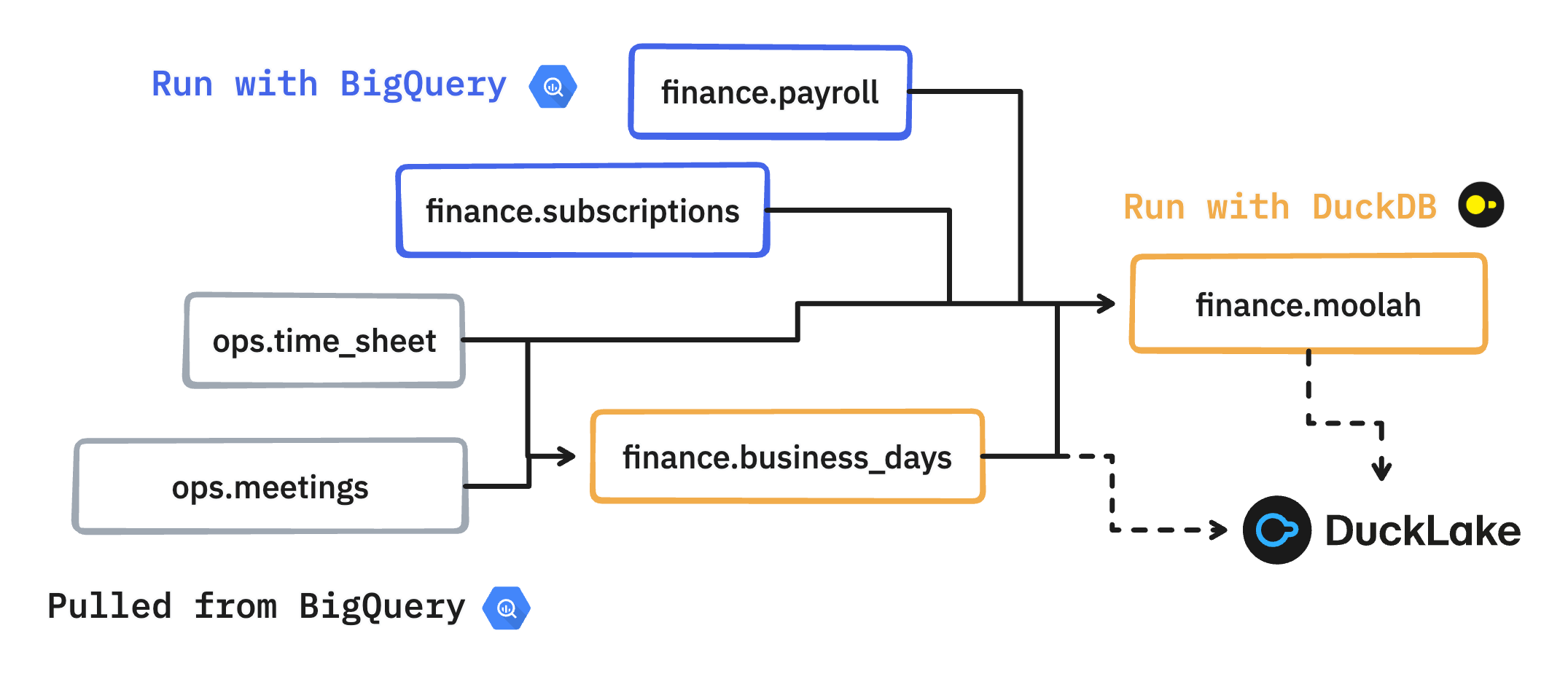
finance.payrollandfinance.subscriptionshave external dependencies (third-party data) and therefore can only be run with BigQuery. DuckDB can’t execute them because of access issues, which is fine.ops.time_sheetandops.meetingsare not part of the selected views, but are necessary to refresh those that are. They are therefore pulled from BigQuery into DuckLake prior to execution.finance.business_daysdependencies have been pulled, which enables local execution.finance.moolahdepends onfinance.business_dayswhich has been materialized locally. It also depends onfinance.payrollandfinance.subscriptions, which have been materialized in BigQuery. There’s alsoops.time_sheetwhich has already been pulled down. The script can tap into all four dependencies, from both sources, and run locally.
In short, lea figures out what data needs to be pulled down, what to run in BigQuery, and what can be executed locally. It’s not rocket science, it’s just a matter of analyzing the DAG and transpiling when needed.
What’s great is that running in quack mode comes at almost no cost. There’s just some stuff that necessarily runs in BigQuery:
- Root scripts with external dependencies that are outside the DAG. For instance your BigQuery might have access to Fivetran, but DuckDB doesn’t, so all queries that tap into Fivetran must run via BigQuery.
- When a table has to be pulled, a
SELECT * FROM tableis run, which is dirt cheap.
Once the results are materialized in DuckLake, then what? You likely want to eyeball the data, to check your script did what it’s supposed to. There are two ways to do so. First, you can use DuckDB’s (excellent) local UI. It can be accessed by calling duckdb -ui once you’ve attached to DuckLake from a DuckDB interpreter. That’s cumbersome, so I added an extra command to lea:
lea quack-ui
You can also push back the results from DuckLake to your warehouse via the --quack-push flag:
$ lea run --select finance/ --quack --quack-push
[11:26:08] 📝 Reading scripts
           283 table scripts
           45 test scripts
[11:26:12] 275 tables already exist
           🦆 Quack mode enabled
[11:26:13] 🦆 Loading BigQuery extension for DuckLake
           🦆 Pulling 2 dependencies into DuckLake
           PULLING kaya.max.meetings → ops.meetings
           PULLING kaya.max.ops__time_sheet → ops.time_sheet
[11:26:16] SUCCESS kaya.max.ops__time_sheet → ops.time_sheet, 1,083 rows (2.9s)
[11:26:17] SUCCESS kaya.max.meetings → ops.meetings, 3,210 rows (3.2s)
           🔵 Running 4 scripts
           RUNNING finance.business_days (DuckLake)
           SUCCESS finance.business_days, contains 13 rows
           RUNNING kaya.max.finance.subscriptions (BigQuery)
           RUNNING kaya.max.finance.payroll (BigQuery)
[11:26:21] SUCCESS kaya.max.finance.subscriptions, took 0:00:03, cost $0.00, contains 94,500 rows, weighs 6MB (on-demand billing)
[11:26:25] SUCCESS kaya.max.finance.payroll, took 0:00:07, cost $0.00, contains 25,225 rows, weighs 2MB (on-demand billing)
           🦆 Refreshing BigQuery extension metadata cache
           RUNNING finance.master_sheet (DuckLake)
[11:26:28] SUCCESS finance.master_sheet, took 0:00:03, contains 2,096 rows
           🦆 Pushing 2 DuckLake tables to BigQuery
           PUSHING finance.business_days → kaya.max.finance__business_days
           PUSHING finance.master_sheet → kaya.max.finance__master_sheet
[11:26:39] SUCCESS finance.business_days → kaya.max.finance__business_days, 13 rows (5.7s)
           SUCCESS finance.master_sheet → kaya.max.finance__master_sheet, 2,096 rows (5.9s)
           😴 Ending session
           ✅ Finished, took 0:00:25, cost $0.00
This is handy and allows you to stay in the SQL IDE flow you’re familiar with. It also enables another pattern, which is to completely refresh the DAG in production with DuckDB, and push the final artifacts to your warehouse. That can sound a bit far-fetched, but then again DuckDB is awesome, so why not? You might hit the same roadblock I did: pulling big tables – think >100GB – from your warehouse into DuckLake takes too long.
This is where Iceberg comes in: it separates compute from storage, allowing different warehouse technologies to interact on the same data with zero copying. DuckDB recently added Iceberg write support, so hybrid cloud/DuckDB DAG executions on top of Iceberg are now possible. But that’s another story for another day. At this point, you might also want to consider MotherDuck, which has apparently good support for hybrid local/cloud orchestration.
I do realize this blog post can appear interesting without being practical, because not many people use lea. However, I hope I have convinced you that transpiling to DuckDB is possible and useful. I’m sure someone who knows a bit about dbt’s inner clockwork could get it done. There have been a couple of failed attempts – see dbt-duckdb#544 and dbt-duckdb#22. It’s probably easier to contribute to SQLMesh where transpiling is a first-class citizen.
I also want to mention Greybeam, which to my understanding is selling this approach as a service. For some reason they only cater to Snowflake. But I suppose they will eventually support other warehouses. The approach is beneficial to everyone – except cloud vendors! – so anyone working in this direction is a hero of mine. I’ll be glad if we can live in a world where warehouse costs aren’t a cause of stress.