Putting Wikipedia on turbopuffer
TLDR: People edit Wikipedia pages all the time. We want a search index that keeps in sync. We do that with Redpanda Connect (ingestion) + turbopuffer (indexing) + a homemade frontend. We manage a 20s p99 ingestion delay, costing ~50$/month.
Today is “h4x day” at turbopuffer. It’s basically a 24-hour hackathon fueled by good food, electrolytes, and high beats per second music. Everyone picks a project, ideally something they would not have tackled in their regular work stream. It’s very energizing. I’m grateful to be surrounded by so many smart and thoughtful people. I feel clumsy around my new colleagues.
The ingestion aspect of a search engine has piqued my interest. turbopuffer is only 3 years old, so its scope is intentionally limited. We “only” handle the hardcore write/storage/query database stuff. Whatever has to happen before writing the data into turbopuffer is out of scope, so far. We basically tell people to write a script and orchestrate it themselves. But this part can be a maintenance nightmare. Judging by the success of companies that solve ingestion (e.g. Fivetran and Airbyte), it is a problem worth addressing.
I thought it would be educational to hack in this direction. A nice use case is Wikipedia. Let’s say you have an app/agent that wants to search over it. You could index one of their dumps whenever a new one is published. But that’s not good enough, because the data will be stale – e.g. who won the midterm elections?. This is the same reason why you don’t want agents to answer some questions via whatever they internalized at training time. You want a search index that is in sync with the current content.
There are companies that cater to searching over the internet for agents (e.g. Exa, Tavily, Firecrawl). Google Search is excellent at sending a human to a relevant webpage. An agent needs a different interface: a stable API, clean extracted text, useful metadata, and enough provenance to cite its sources. A page of blue links is only half the job. These companies bundle search, crawling, and extraction into something an agent can consume directly.
In the case of Wikipedia, they actually provide their own search API. Reading their documentation, their search is powered by OpenSearch – the controversial AWS-created fork of Elasticsearch, now governed by a Linux Foundation project. They keep it up to date by indexing new edits via Flink, which is a stream processing engine.
There’s actually a live feed of public changes across Wikimedia projects. I’ve worked with it in the past to reproduce one of their Lift Wing inference endpoints, namely a model that predicts the probability that an edit will be reverted. These scores can help patrollers prioritize which edits to review. They do not determine whether an edit was made in good faith.
For the sake of simplicity, I’ve limited myself to the English portion of Wikipedia. There are roughly 7.26M articles in total. By my estimate, the number of article edits is roughly 5k/hour, or 1.38/second. These are very small numbers. I don’t know how much the Wikimedia Foundation is paying for their Flink + OpenSearch setup, but I’m convinced a reduced version can be done at a very small cost. Instead – or in addition to – helping Wikipedia via a donation, I thought I was in a good position to build a cheap prototype that could convince them to puff if needed. I know they have a guiding principle of favoring open-source software, but that discussion is above my paygrade.
I think Flink is too complex for my ingestion part. Wikimedia’s real updater merges several Kafka streams, deduplicates events, handles rerenders and backfills, and writes to multiple search clusters. It has genuine stateful work to do. My reduced prototype boils down to moving data from a source (SSE events) to a sink (turbopuffer), with very little business logic in the middle.
I did consider using Airbyte, but it doesn’t fit this use case. Its usual abstraction is a scheduled sync, although it persists cursors and supports change data capture for some databases. Fivetran can likewise run incremental syncs as often as once per minute. Neither gives me an off-the-shelf Wikimedia SSE to turbopuffer pipeline. Here the goal is for the search index to be as up-to-date as possible, so I wanted a process that keeps the stream open.
I replaced it with Redpanda Connect, which is built on top of Benthos. Despite the name, Redpanda Connect does not require a Redpanda cluster. It is a lightweight stream processor where pipelines are described as an input, a sequence of processors, and an output. The input reads messages, the processors transform them, and the output delivers them somewhere. A Unix pipe for data systems, basically.
Why not write a regular Go/Python script? Indeed, the happy path would be straightforward. The annoying part is everything around it: reconnecting to a stream, retrying HTTP requests, backing off when Wikipedia returns a 429, limiting concurrency, batching writes, applying backpressure, exposing health checks, and flushing the current batch during a graceful shutdown. Redpanda Connect already handles these details. The pipeline itself boils down to YAML. This is part of the category of software you don’t want your coding agent to reimplement.
There was no turbopuffer output, so I built one and proposed contributing it upstream. In Redpanda Connect terminology, an output is the connector for a destination. The output/turbopuffer.go file is that connector, not a separate script. It defines the turbopuffer YAML block, receives batches of JSON documents, and turns them into turbopuffer upsert_rows requests. It also tells Redpanda Connect how many requests may run concurrently and returns failed writes to the runtime so they can be retried. If the same Wikipedia page occurs more than once in a batch, the latest version wins.
The connector is generic – it is not tied to Wikipedia – so any Redpanda Connect pipeline can use it. The custom binary’s main.go imports the connector and HTML-to-text processor packages to register them, then starts the Benthos service runtime used by Redpanda Connect. The connector lives in the public Wikipedia prototype and is not included in Redpanda Connect’s built-in component catalogue yet.
The whole setup looks like this:
Initial load:
Wikipedia dump -> Redpanda Connect -> turbopuffer

Live updates:
Wikipedia event stream -> fetch current page -> Redpanda Connect -> turbopuffer

Reconciliation (every 5min):
MediaWiki recent changes -> fetch current pages -> turbopuffer watermark

Search:
Browser -> small Go web app -> turbopuffer
The initial load and the live updates solve two different problems. The event stream is useful for incremental changes, but not for reconstructing millions of existing articles. Starting from it would give me a fresh index containing almost diddly squat. I therefore bootstrap the index from Wikimedia’s weekly CirrusSearch dumps. The backfill pipeline downloads each compressed shard, decompresses it as a stream, parses one page at a time, and sends batches to turbopuffer. It never has to fit a whole shard on disk or in memory.
For live updates, a second pipeline listens to Wikimedia’s recentchange stream. It keeps new pages and edits from the English article namespace, and discards the rest. A change event does not contain the full article, so the pipeline calls Wikipedia’s REST API to fetch the latest HTML and converts it to plain text. The resulting document is roughly:
{
  "id": "45371",
  "title": "Toulouse",
  "text": "Toulouse is the prefecture of...",
  "url": "https://en.wikipedia.org/wiki/Toulouse",
  "revision_id": 1383749154,
  "updated_at": "2026-11-04T16:27:07Z"
}
The Wikipedia page ID is used as the turbopuffer document ID. This is important. Retrying the same event simply replaces the same row instead of creating a duplicate. In data engineering jargon, the write is idempotent. The pipeline flushes when it has collected 100 pages or when one second has elapsed, whichever happens first. At ~1.38 edits per second, the time limit usually wins. Batching still avoids paying for one HTTP request per edit.
Here’s the shape of the configuration. I’ve omitted the SSE framing, authentication, HTML conversion, schema, and final field mapping for readability:
input:
  http_client:
    url: https://stream.wikimedia.org/v2/stream/recentchange
    stream:
      enabled: true
      reconnect: true

pipeline:
  processors:
    - mapping: |
        root = if this.wiki == "enwiki" && this.namespace == 0 {
          this
        } else {
          deleted()
        }
    - http:
        url: https://en.wikipedia.org/w/rest.php/v1/page/${! this.title }/with_html

output:
  turbopuffer:
    namespace: wikipedia-en-live
    batching:
      count: 100
      period: 1s
I deployed the live pipeline as a single always-on Cloud Run instance on our turbopuffer infrastructure. The search site is a separate service and queries turbopuffer directly. Redpanda Connect is therefore only on the write path. I also gave the two services separate credentials: the ingester has a key scoped to reading and writing its ingestion namespace, whilst the public website has a query-only key. Leaking a public query key would still be annoying, but at least it could not rewrite Wikipedia.
The stream gives low latency, but it is not the source of truth. Alongside it, the ingester runs a reconciliation pass every five minutes against MediaWiki’s recentchanges API. Each pass chooses a fixed end time, lists everything that changed since the previous watermark, and fetches the current CirrusSearch document for every affected page. That covers edits which arrived while the SSE connection was down, as well as moves and deletes that the fast path does not handle.
The watermark is another small document in turbopuffer, and it only advances after the complete window has been reconciled. If the process dies halfway through, it repeats the same window after restarting. Repetition is safe because page IDs are stable and the writes are revision-aware: turbopuffer only accepts an update when its revision ID is newer than the stored one. Deletes are conditional too, so a delayed reconciliation cannot delete a page which has since been recreated. This gives me the property I actually care about: the stream makes changes visible quickly, and the periodic pass makes the index converge to Wikipedia’s current state.
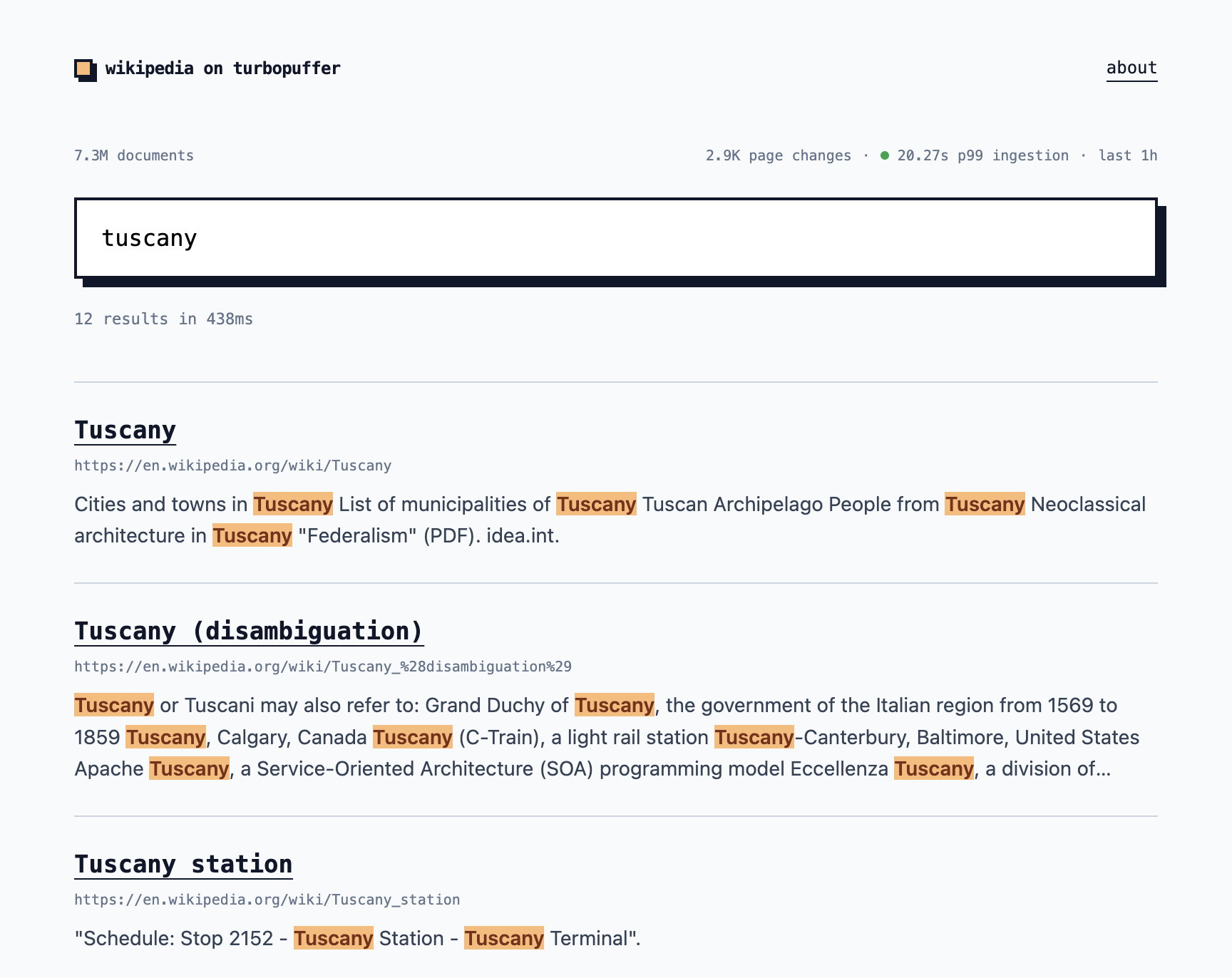
I gave the prototype a 30-second freshness SLA: the p99 ingestion latency should stay below 30 seconds. In plain English, 99% of the observed page changes should travel from Wikimedia’s event stream to the turbopuffer ingestion path within 30 seconds. The frontend calculates this over a rolling one-hour window by subtracting the source event timestamp from the ingestion timestamp stored on each document. At the time of writing, the p99 was 20.27 seconds, so the SLA was met.
In terms of final output, I made a simple search frontend:
What does this cost? The turbopuffer Launch plan starts at $16/month. The always-on Cloud Run ingester uses one vCPU and 512MiB in us-central1. At the current instance-based rates, the back-of-the-envelope calculation is:
turbopuffer                         $16.00
Cloud Run CPU     730h × $0.04536   $33.11
Cloud Run memory  730h × $0.00252    $1.84
                                      -----
                                     $50.95/month
Call it ~$50/month. This assumes the turbopuffer workload stays below the Launch plan’s $16 minimum. The search frontend instance scales to zero, so its cost should be negligible. This estimate excludes the one-off backfill and small network/secret-storage charges.
That’s it! Admittedly, other than writing this blog, my coding agent did the heavy lifting. But I still find it valuable to understand the concepts, the tradeoffs, the fundamental principles. For instance, why pick Redpanda Connect over Airbyte? There’s so much software out there, so many options, it’s not easy to make the right architecture decisions. I hope this blog post makes the ingestion part of turbopuffer a bit clearer!